
| Quick Summary |
|---|
Push and pull compensation helps embroidery designs stitch cleanly on fabric.
|
Push and pull compensation in embroidery means adjusting a design so it stitches cleanly on real fabric, not just on screen. During embroidery, thread tension can pull stitches inward or push them outward. This can make borders shift, letters shrink, shapes look uneven, and small details lose clarity.
For this reason, digitizers plan stitch direction, underlay, density, and spacing before the machine starts. These small changes help the final embroidery hold its shape on shirts, hats, patches, polos, hoodies, and other fabric items.
Also, good compensation reduces gaps, puckering, thread breaks, and wasted garments. For clean, production-ready results, Absolute Digitizing provides the best embroidery digitizing services that help your artwork stitch sharp, balanced, and professional.

- What Does Push and Pull Compensation Mean in Embroidery Digitizing?
- Why Is Push and Pull Control So Important in Embroidery?
- What Causes Push and Pull Effects During Embroidery?
- In Which Situations Does Push and Pull Compensation Matter Most?
- What Is the Key Difference Between Pull Compensation and Push Compensation?
- What Factors Influence Push and Pull Compensation?
- What Are the Common Problems Caused by Poor Compensation?
- How Do Professional Digitizers Handle Push and Pull Compensation?
- How Does Compensation Vary for Different Embroidery Items?
What Does Push and Pull Compensation Mean in Embroidery Digitizing?
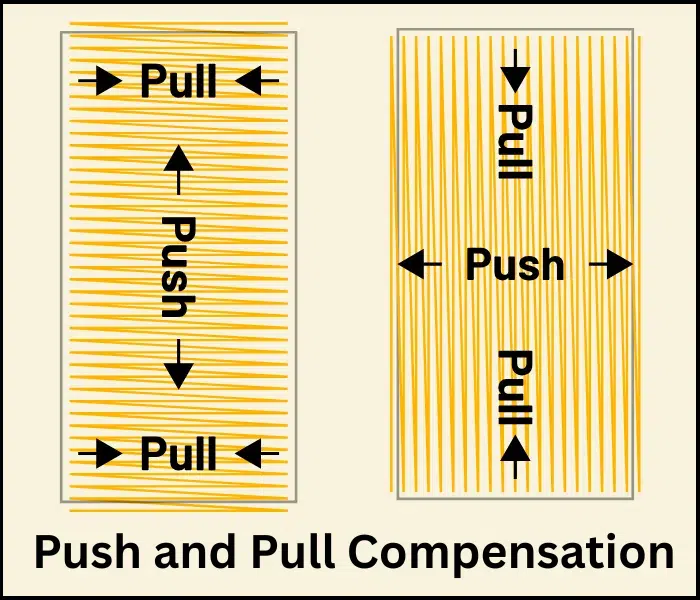
Push and pull compensation is the process of adjusting a design in advance so that it stitches out correctly on fabric. Because fabric moves and stitches apply tension, the final result will never match the exact on-screen shape unless these corrections are made.
What “Pull” Really Means
Pull happens across the width of the stitches.
When stitches are laid down, they tighten and pull the fabric inward, reducing the width of shapes. This is why satin columns often come out thinner than designed. It can also create visible gaps between objects, especially where fills meet borders.
What “Push” Really Means
Push happens in the direction the stitches are running.
As stitches are added, they build up and push the fabric outward along the stitch path. This can cause shapes to extend slightly, corners to round off, and edges to look less sharp.
What Compensation Actually Involves
A good digitizer doesn’t just “make things bigger.” The adjustments are more controlled:
- Increasing column width to counter pull
- Adding overlap between elements to avoid gaps
- Changing stitch direction to balance the distortion
- Adjusting the underlay to stabilize the fabric
- Fine-tuning density to avoid buildup or gaps
These changes are intentional distortions so that the final stitched result looks correct, not the screen version.
Why This Matters
Without proper push and pull compensation, you typically see:
- Gaps between outlines and fills
- Text is becoming too thin or unreadable
- Rounded corners instead of sharp ones
- Uneven edges and poor alignment
- Fabric puckering or distortion
The Real Goal
A beginner often judges a design by how it looks on screen. That’s a mistake.
A well-digitized file may actually look slightly “off” in software, but it’s designed that way so that once stitched, it becomes clean, balanced, and accurate on real fabric.
Why Is Push and Pull Control So Important in Embroidery?
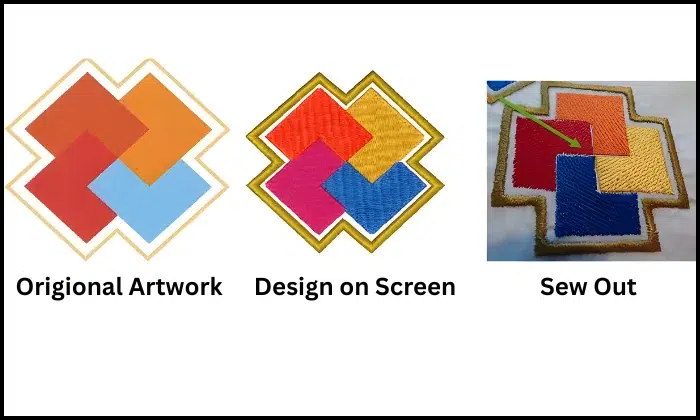
Push and pull control matters because fabric moves during stitching. A design may look perfect in software, but thread tension can change its shape on the garment.
What happens without proper control
When a digitizer ignores these forces, the final embroidery can look uneven. Borders may not line up. Small letters may get thin or crowded. Filled areas may shrink, and fabric may show around the edges.
Common issues include:
- Gaps between fill and outline
- Puckered fabric
- Thin lettering
- Bulky edges
- Uneven logo shape
- Poor repeat results
However, proper compensation helps the design stitch closer to the original artwork. It also helps the same logo look more consistent on cotton, polos, caps, hoodies, and patches.
As a result, the embroidery looks cleaner and more professional. Good compensation also reduces wasted garments, extra thread breaks, and repeat sew-outs. This saves time and helps business orders stay on track.
What Causes Push and Pull Effects During Embroidery?
Push and pull happen because every stitch places pressure on the fabric. The embroidery machine needle moves up and down, while the thread locks into the material. This action can slightly shift the design while the machine keeps sewing.
Main causes of stitch movement
Fabric stretch plays a big role. Soft, thin, or stretchy fabric moves more than stable fabric. As a result, the same design may stitch differently on a polo than on a canvas bag.
Machine tension also affects the final result. If the thread pulls too tight, stitches can draw the fabric inward. If the tension is not balanced, the design may pucker or look uneven.
Hooping matters too. Loose hooping lets the fabric move during stitching. However, hooping too tightly can stretch the fabric and cause distortion after release.
Other key causes include:
- Stitch direction
- Stitch density
- Design size
- Thread type
- Stabilizer choice
- Fabric thickness
- Machine speed
- Needle size
Therefore, digitizers must plan the file around the fabric and machine setup. Good planning helps control movement before problems appear.
In Which Situations Does Push and Pull Compensation Matter Most?
Push and pull control matters most when a design has small details, tight borders, or large stitch areas. These parts move more during sewing and quickly show mistakes.
Also, fabric type changes the result. Stretchy polos, soft hoodies, towels, caps, and thin shirts need more care than firm fabrics. Stitch direction also matters because stitches pull across their width and may push at their ends.
Complex designs can suffer the most, such as:
- Small logo text
- Satin stitch borders
- Filled shapes with outlines
- Round badges
- Patch designs
- Cap logos
- Tiny details
What Are Common Signs That Your Design Needs Pull Compensation?
A design may need pull control when you see:
- Gaps between fill and outline
- Thin letters
- Narrow satin columns
- Fabric showing at the edges
- Circles turning into ovals
- Shapes look smaller after stitching
What Are Common Signs That Your Design Needs Push Compensation?
On the other hand, push issues look different. You may notice:
- Bulky letter ends
- Thick borders
- Rounded corners
- Stretched shapes
- Crowded small details
- Filled areas passing the outline
What Is the Key Difference Between Pull Compensation and Push Compensation?
Both solve different stitch problems. Pull controls inward movement. Push controls outward spread.
Key Difference:
| Factor | Pull Compensation | Push Compensation |
|---|---|---|
| Main issue | Fabric pulls inward | Stitches spread outward |
| Common sign | Thin letters or outline gaps | Bulky edges or stretched shapes |
| Used for | Satin text, fills, borders | Satin ends, corners, dense areas |
| Digitizing fix | Add slight width or overlap | Adjust stitch direction, spacing, or length |
| If ignored | The design looks small or separated | The design looks heavy or distorted |
So, pull compensation helps to stop shrinkage. Push compensation helps stop spreading.
Both need the right setting in the stitch file. A skilled digitizer adjusts the design for the fabric, stitch type, and final size.
What Factors Influence Push and Pull Compensation?
Several things decide how much stitch adjustment a design needs. A digitizer must check the fabric, thread, stitch type, size, speed, and hooping before production.
Also, no single setting works for every garment. A logo that stitches well on twill may not stitch the same way on a polo or hoodie.
Fabric Type Matters
Fabric changes how much the design moves. Stretchy and soft fabrics need more control. Stable fabrics usually need less adjustment.
| Fabric Type | Common Issue | Digitizing Tip |
|---|---|---|
| Cotton | Light shrinking | Use balanced density |
| Polo knit | Stretch and gaps | Add careful pull control |
| Fleece | Stitches sink | Use a strong underlay |
| Twill | Less movement | Keep density clean |
| Hoodie fabric | Soft surface moves | Support with underlay |
| Cap fabric | Curved shape shifts | Plan stitch order well |
How Do Stitch Types Affect Push and Pull?
Different stitches move in different ways. Run stitches move less. Satin stitches can pull inward and push at the ends. Fill stitches can shift larger areas.
| Stitch Type | Best Use | Common Risk |
|---|---|---|
| Run stitch | Fine lines and detail | Can look weak if too light |
| Satin stitch | Text and borders | Can shrink or look bulky |
| Fill stitch | Large shapes | Can pull fabric or create gaps |
Therefore, the digitizer must choose the right stitch type for each part of the design.
What Is the Role of Underlay Stitches in Managing Push and Pull?
Underlay stitches work like a base. It holds the fabric before the top stitches are sewn.
Good underlay can:
- Support soft fabric
- Keep edges cleaner
- Reduce sinking
- Improve outline alignment
- Help the design hold shape
However, too much underlay can make embroidery stiff.
How Does Stitch Density Affect Push and Pull Compensation?
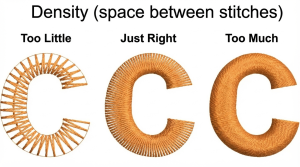
Density means how close the stitches sit together. High density adds more thread and tension. This can cause puckering, stiffness, and distortion.
On the other hand, low density can leave fabric showing.
Other factors also matter, such as thread weight, design size, stitch direction, machine speed, and hooping.
For best results, every stitch file should match the fabric, design size, and final use. Absolute Digitizing can help you prepare clean, production-ready files that reduce gaps, puckering, and stitch distortion before your order reaches the machine.
What Are the Common Problems Caused by Poor Compensation?
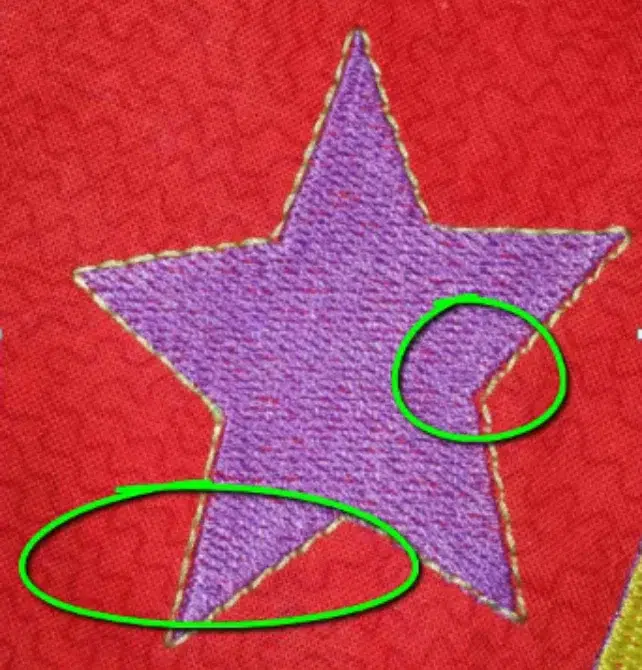
Poor compensation can make a clean design look unprofessional after stitching. The artwork may look right on screen, but the fabric can move during sewing.
As a result, the final embroidery may show gaps, puckering, or uneven borders.
Real Example of Embroidery Gaps After Stitching
A beginner shared a common problem in the Reddit embroidery community: his design appeared perfect in Wilcom embroidery software, but there were visible gaps between colors after stitching.
Hello guys this is my first time here, When i draw a design in Wilcom it shows no imperfections but when I embroider it, these gaps (Image 2) appear between colors. Can someone help me?
https://www.reddit.com/r/Machine_Embroidery/comments/1g00ae5/hello_guys_this_is_my_first_time_here_when_i_draw/
This example shows a common digitizing issue: the design looks clean in software, but fabric movement during stitching creates visible gaps between colors and borders.
Common Issues and Fixes
| Problem | Real Example | Practical Fix |
|---|---|---|
| Puckering | A polo logo wrinkles around dense fill stitches | Lower density and improved underlay |
| Outline gaps | A patch border does not touch the fill area | Add a slight overlap under the border |
| Thin letters | Small satin text shrinks after stitching | Add pull control to the letter width |
| Bulky edges | Rounded letters look swollen | Adjust stitch direction and spacing |
| Misalignment | A cap logo shifts to one side | Improve hooping and stitch order |
| Fabric showing | Fill stitches pull away from the edge | Extend the fill under the outline |
For example, a business logo with small text can lose readability if the letters pull inward. Also, a badge design can look cheap when the border separates from the fill.
You can also watch this short and helpful video to see common mistakes and how small file adjustments can improve the final stitch result.
How Do Professional Digitizers Handle Push and Pull Compensation?
Professional digitizers manage stitch movement before the design reaches the machine. They do not rely only on the artwork preview. Instead, they study how the design will behave on real fabric.
They start by checking the fabric type, design size, thread path, and stitch direction. Then they choose the right stitch types for each part of the artwork.
Professional Digitizing Workflow
A skilled digitizer usually checks:
- Fabric stretch and thickness
- Final design size
- Satin stitch width
- Fill stitch direction
- Underlay support
- Stitch density
- Border overlap
- Stitch order
- Trim and jump points
Also, they use software tools to adjust width, spacing, density, and stitch angle. These changes help letters stay clear, borders stay aligned, and filled areas hold their shape.
After that, they plan the stitch order. This step matters because poor sequencing can pull the fabric from one side and shift the whole design.
For better results, many professionals also test the file on similar fabric. A test sew-out shows real issues that software cannot always predict. If they see gaps, puckering, or thick edges, they revise the file before full production.
Can Auto Digitizing Software Handle Push and Pull Compensation?
Auto digitizing can help with simple shapes. However, it cannot always understand fabric movement, stitch tension, or design purpose.
| Method | Best For | Main Limit |
|---|---|---|
| Auto-digitizing | Simple samples | May miss fabric control |
| Manual digitizing | Logos and text | Needs skill and time |
So, auto tools can save time, but they often need manual cleanup. For logos, embroidered patches, caps, uniforms, and customer orders, professional digitizing gives cleaner and more reliable results.
How Does Compensation Vary for Different Embroidery Items?
Compensation changes with the item, fabric, and design placement. A flat patch does not react like a curved cap. A towel does not hold stitches like a cotton shirt.
So, digitizers adjust stitch direction, underlay, density, and overlap based on where the design will sew.
Item-Based Compensation Guide
| Embroidery Item | Common Issue | Best Digitizing Focus |
|---|---|---|
| Caps | A curved surface shifts the design | Use center-out stitch order |
| Towels | Stitches sink into the fabric | Add a strong underlay and topping |
| Jackets | Thick fabric can create stiffness | Balance density and stitch length |
| Polos | Stretch can pull letters inward | Use careful pull control |
| Patches | Borders may separate from fills | Add overlap under the edge |
| Lightweight shirts | Fabric can pucker fast | Use a lighter density and support |
Quick Tips for Better Results
- Match the file to the item.
- Avoid heavy density on soft fabric.
- Add support for towels and fleece.
- Use clean overlap for patches.
- Test curved items before bulk stitching.
As a result, each item gets cleaner edges, better shape, and stronger wearability.
What Are Common Mistakes Beginners Make with Push and Pull?
Beginners often trust the screen preview too much. The design may look clean in software, but the fabric can still move during stitching.
Mistakes to Avoid
- Using the same settings for every fabric
- Skipping underlay stitches
- Adding too much compensation
- Using heavy stitch density
- Ignoring stitch direction
- Making small text too tiny
- Forgetting overlap under borders
- Skipping a test sew-out
- Relying only on auto-digitizing
Also, many beginners try to fix gaps by adding more stitches. This can make the design stiff and cause puckering.
A better way is to study the fabric, adjust the stitch direction, and test the file. Keep notes from each sew-out. Over time, these notes help you learn what works on polos, caps, patches, towels, and other items.
What Are the Best Practices for Cleaner Embroidery Results?
Clean embroidery starts before the machine runs. A good digitizer plans the file for the fabric, design size, and final use.
Simple Quality Checklist
- Match the file to the fabric
- Choose the right stitch type
- Use underlay stitches for support
- Keep stitch density balanced
- Add overlap under outlines
- Watch the satin stitch width
- Control stitch direction
- Reduce extra trims and jumps
- Test on a similar fabric
- Check the final sew-out
However, do not overcorrect the design. Too much adjustment can create bulky edges, thick letters, or hard fabric.
After testing, review the design closely. Check borders, small text, curves, and filled areas. Then revise the file if needed.
This careful process helps reduce gaps, puckering, distortion, and wasted garments.
When Outsourcing Becomes the Best Choice
Outsourcing embroidery digitizing services makes sense when a design needs clean detail, fast turnaround, or reliable results. It also helps when you handle customer orders and cannot risk wasted garments.
Key Factors to Consider
- Design complexity
A detailed logo, tiny text, or tight border needs expert stitch planning. - Time limits
A professional can prepare the file faster than repeated DIY testing. - Cost control
Poor digitizing can waste shirts, hats, thread, and production time. - Fabric difficulty
Soft, stretchy, thick, or textured fabric needs careful stitch adjustment. - Order size
Bulk orders need consistent results across every item. - Quality needs
Business logos must look sharp, readable, and professional.
Furthermore, software takes time to learn and can be costly. Even then, results may not look right without experience.
So, hiring a skilled digitizing team can be the smarter choice. It helps reduce mistakes, protect garments, and deliver cleaner embroidery with less stress.
Final Thoughts
Clean embroidery starts with smart digitizing. Push and pull can change the shape of a design once the needle hits the fabric. So, every file needs the right stitch direction, underlay, density, spacing, and fabric support.
With proper planning, your design can stitch with cleaner borders, smoother fills, and clearer text. It also helps reduce puckering, gaps, thread breaks, and wasted garments.
For high-quality, production-ready embroidery files, contact Absolute Digitizing today and get a free quote!
FAQs
Push and pull compensation means adjusting the stitch file before sewing so the design looks right on the fabric. Pull happens when stitches draw fabric inward. Push happens when stitches spread outward.
This issue usually happens because the fabric moves while the design is being stitched. The fill area may pull inward, while the outline stays in a different place.
To fix this, add overlap under the border, adjust pull control, use a better underlay, and test the design on the same fabric.
There is no one perfect number for every design. The right amount depends on fabric type, stitch type, design size, thread tension, and machine setup.
For example, stretchy fabric often needs more control than firm fabric. A test sew-out is the best way to check the correct setting before production.
Yes. Underlay stitches create a base under the top stitches. They help hold the fabric, support satin columns, reduce sinking, and keep edges cleaner.
However, too much underlay can make the design stiff. Too little underlay can let the fabric move too much. The digitizer must match the underlay to the fabric and design.
Puckering can happen when the design has too much stitch density, poor hooping, a weak stabilizer, tight thread tension, or wrong underlay.