| Quick Summary |
|---|
Quality embroidery starts with a clean, machine-ready digitized file.
|
A clean stitch file ensures quality embroidery. Before the needle touches the fabric, the design must be set up the right way. A poor file can cause puckering, thread breaks, gaps, rough edges, and wasted products.
That is why it helps to outsource embroidery digitizing with care. A skilled digitizer studies your artwork, fabric, size, and placement before creating the file. This step helps your logo, patch, cap, or shirt design stitch smoothly.
Also, good digitizing saves time for small businesses and hobbyists. It reduces trial and error and helps you avoid costly mistakes.
Absolute Digitizing provides reliable embroidery digitizing services for clean, machine-ready files. Share your artwork, and get a file made for better stitch results.
- What Qualities Should You Look for in an Embroidery Digitizing Service?
- Why Is Service Quality More Important Than Choosing the Cheapest Digitizing Option?
- What Are the Warning Signs of a Poor Embroidery Digitizing Service?
- What Are the Top 5 Tips for Outsourcing Digitizing Services?
- What Information Should You Provide to an Embroidery Digitizing Service?
- What Is the Cost of Embroidery Digitizing Services?
- How Can You Tell If You’ve Received a High-Quality Digitized File?
- What’s the Difference Between Auto Digitizing Software and Professional Digitizing Services?
- Why Outsource Professional Embroidery Digitizing Services?
What Qualities Should You Look for in an Embroidery Digitizing Service?
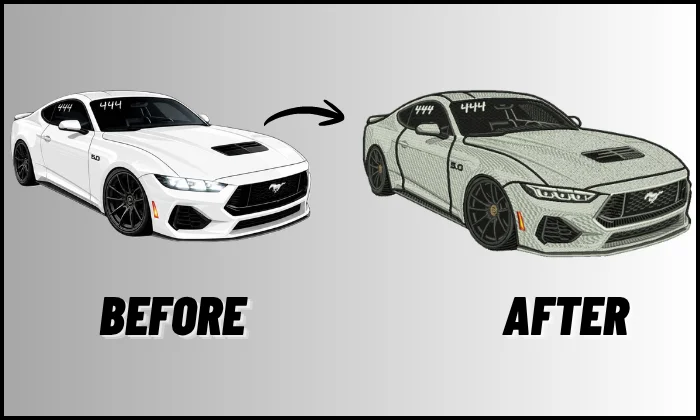
A reliable embroidery digitizing service uses an in-house digitizing team instead of auto tools or third-party outsourcing. This gives you more control, better quality checks, and more consistent results. The team studies your design, fabric, size, placement, and machine format before creating a clean stitch file.
Clear Communication
Choose a service that asks the right questions. Good communication helps avoid wrong sizes, poor placement, and file issues.
Look for these signs:
- Quick replies
- Clear pricing
- Simple order steps
- Helpful revision support
- Honest turnaround times
Also, check reviews before you order. Real customer feedback can show how the team handles support and fixes.
Real Embroidery Knowledge
A skilled digitizer knows how stitches act on different fabrics. This matters for caps, polos, towels, jackets, and embroidered patches.
| Quality | Why It Matters |
|---|---|
| Underlay control | Keeps stitches stable |
| Density control | Prevents stiff designs |
| Pull compensation | Helps shapes stay correct |
| File format knowledge | Matches your embroidery machine |
| Custom design skill | Handles complex artwork better |
Strong Portfolio or Stitch Samples
Ask for real stitch-out photos, not only digital previews. Samples show clean borders, smooth fills, and readable text. Also, test a small order before sending bulk orders.
Why Is Service Quality More Important Than Choosing the Cheapest Digitizing Option?
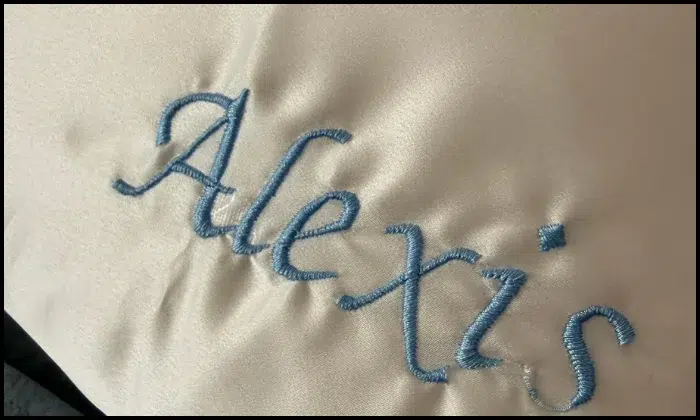
Cheap digitizing can look like a fantastic deal at first. However, a weak stitch file can increase production costs. It may cause thread breaks, puckering, rough edges, or missing details.
Cheap Files Can Waste Products
Poor digitizing can ruin shirts, caps, towels, jackets, or patches. It can also slow down your machine and delay customer orders.
Common problems include:
- Broken threads
- Uneven outlines
- Stiff embroidery
- Fabric puckering
- Hard-to-read text
- Extra machine stops
Quality Saves Time and Money
A quality file runs smoother on the machine. It uses the right underlay, stitch density, and pull compensation for the fabric.
As a result, you spend less time fixing mistakes. You also protect your materials, thread, and order deadline.
Better Results Build Trust
Your embroidery reflects your brand. Clean stitching helps your products look professional and ready to sell.
Also, satisfied customers are more likely to order again. That makes quality digitizing a better long-term choice than the lowest price.
What Are the Warning Signs of a Poor Embroidery Digitizing Service?

Red flags help you avoid wasted time, bad files, and ruined products. A weak service may promise fast work, but the final file may not stitch well.
No Questions About Fabric or Placement
Be careful if the provider does not ask about fabric, size, or placement. A cap logo needs different settings than a polo, towel, or jacket back design.
As a result, one basic file may not work well for every item.
No Real Samples
A digital preview can look clean on screen. However, it does not prove the design will stitch well on fabric.
Ask for real stitch-out photos. Look for clean borders, smooth fills, and readable small text.
No Clear Revision Policy
Small fixes are normal after a test stitch. Poor service may avoid revisions or charge for every small change.
So, ask about edits before placing your order.
Common Red Flags
| Warning Sign | Why It Matters |
|---|---|
| Unclear pricing | You may face hidden charges |
| No portfolio | You cannot judge their work |
| Generic replies | They may not understand your job |
| No reviews | You cannot check trust |
| No revision policy | Fixes may become stressful |
| Very low price | The file may be rushed |
To stay safe, start with a small test order before sending bulk work.
What Are the Top 5 Tips for Outsourcing Digitizing Services?
Good quality digitizing starts with clear planning. Before you place an order, make sure the service understands your design, fabric, size, deadline, and machine needs.
These tips help you avoid weak files and get cleaner stitch results.
1: Check Their Real Stitch-Out Quality
A clean digital preview is not enough. It only shows how the design looks on screen. A real stitch-out shows how the file works on fabric.
Ask for photos of finished embroidery. Look closely at the borders, fills, and small text.
Check for these quality signs:
- Smooth edges
- Clear lettering
- No fabric gaps
- No thread buildup
- No puckering
- Even stitch coverage
Also, ask if they test complex designs before delivery. This matters for logos, patches, caps, and jacket backs.
2: Ask About Fabric, Size, and Placement Before Ordering
The same design needs different settings for different products. A cap logo does not stitch like a towel design. A jacket back needs a different setup than a polo logo.
So, share the right details before work starts.
| Project Detail | Why It Matters |
|---|---|
| Fabric type | Helps control stitch density and underlay |
| Design size | Keeps details clear and readable |
| Placement | Helps plan stitch direction |
| Product type | Caps, towels, fleece, and jackets need special care |
| Final use | Business logos and patches may need stronger borders |
For example, fleece needs support because stitches can sink. Caps need careful pull control because the surface is curved.
3: Make Sure They Understand Underlay, Density, and Pull Compensation
This part affects the final stitch quality the most. A skilled digitizer does not just place stitches. They control how the design holds, moves, and covers the fabric.
| Term | Simple Meaning | Why It Helps |
|---|---|---|
| Underlay | Base stitches under the top stitches | Keeps fabric stable |
| Density | How close stitches sit together | Prevents stiff or weak designs |
| Pull compensation | Extra width added to balance fabric pull | Helps shapes stay correct |
| Stitch direction | The angle stitches follow | Adds clean texture and flow |
| Pathing | The order stitches run | Reduces trims and thread breaks |
As a result, the design runs smoother and looks cleaner after stitching.
Watch this short video to learn how skilled digitizing controls stitch direction and detail for complex embroidery and why manual quality matters before production.
4: Confirm File Formats and Editable Files
Always ask for the correct machine format before placing the order. Different embroidery machines read different files.
Common formats include:
- DST
- PES
- JEF
- EXP
- VP3
- HUS
Also, ask if they can provide an editable file when needed. This helps if you want future changes in size, colors, or layout.
5: Review Turnaround, Revisions, and Communication
Fast service helps, but quality still matters. A rushed file can create more work later.
Ask these questions before ordering:
- When will I receive the file?
- Do you offer revisions?
- What changes are free?
- How should I send feedback?
- Can you handle urgent orders?
Also, choose a service that explains things in simple words. Good support saves time and reduces stress.
Bonus Tip: Start With a Small Test Order
A small test order helps you check quality before sending bulk work. Try a left chest logo, cap logo, or small patch first.
Then, run a test stitch. If the file stitches cleanly and the support feels helpful, you can trust them with larger orders.
If you want a clean file without the guesswork, Absolute Digitizing can help. Send us your artwork, fabric details, and machine format. Our team will prepare a smooth, machine-ready embroidery file that helps your design stitch better from the first test.
What Information Should You Provide to an Embroidery Digitizing Service?
Clear order details help the digitizer create a better file. They also reduce delays, wrong sizing, and extra revisions.
Before you place an order, send the best version of your artwork.
Also, explain where the design will go. A left chest logo, cap front, towel, patch, and jacket back all need different stitch settings.
Basic Order Checklist
| Detail to Send | Why It Helps |
|---|---|
| Final size | Keeps text and details readable |
| Fabric type | Helps control density and underlay |
| Placement area | Helps plan stitch direction |
| Machine format | Makes the file ready to use |
| Thread colors | Keeps the design close to your brand |
| Special notes | Explains borders, puff, or patch needs |
| Deadline | Helps avoid production delays |
For better results, share your thread brand or color numbers if you have them. You can also send a sample photo of the style you want.
As a result, the digitizer can create a file that fits your fabric, machine, and final product.
What Is the Cost of Embroidery Digitizing Services?
Embroidery digitizing prices can vary by design. Most standard logo files in the USA often cost a flat rate of around $15 to $40 or $2 to $3 per 1000 stitches. Larger or complex designs can cost $40 to $80 or more, especially when they need more detail, special effects, or rush delivery.
Common Cost Factors
| Cost Factor | How It Affects Price |
|---|---|
| Design size | Larger designs take more time |
| Stitch count | More stitches can raise the cost |
| Detail level | Small text and shading need extra care |
| Fabric type | Towels, caps, and fleece need special settings |
| Special style | 3D puff, patches, and appliqué may cost more |
| Turnaround time | Rush orders may add extra fees |
| Revisions | Some services include minor edits |
Do Not Pick by Price Alone
A low price can seem helpful. However, a poor file may cause thread breaks, puckering, and wasted items.
For the best quote, send your artwork, size, fabric, placement, and file format. Also, ask what the price includes before you order.
How Can You Tell If You’ve Received a High-Quality Digitized File?
A high-quality digitized file should look clean in the preview and stitch well on fabric. Do not send it to bulk production right away. Always inspect it first.
Check the Preview First
Start with the file preview or stitch sheet. Make sure the size, colors, and layout match your order.
Look for these signs:
- Correct design size
- Clean shapes
- Proper thread order
- No missing details
- Fewer jump stitches
- Machine-compatible file format
Also, check if the stitch path looks simple and organized. A messy path can slow the machine and cause extra trims.
Run a Test Stitch-Out
A test stitch-out shows the real file quality. Stitch it on the same or similar fabric you plan to use.
Check the final result for:
- Smooth borders
- Clear lettering
- No puckering
- No thread breaks
- Even fill areas
- Balanced design shape
Ask for Revisions When Needed
Small edits are normal after testing. So, take clear photos of the issue and explain what needs fixing.
A reliable service should help adjust the file for better results.
What’s the Difference Between Auto Digitizing Software and Professional Digitizing Services?
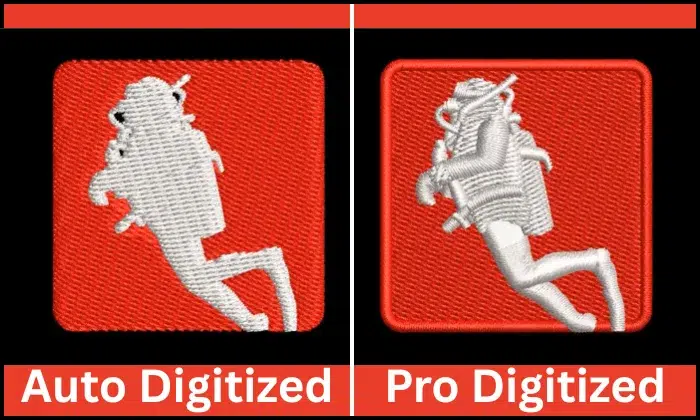
Auto digitizing software turns artwork into stitches with built-in tools. It can work for simple shapes, basic text, or practice designs. However, it may not read fabric type, stitch direction, or small details the way a trained digitizer can.
Auto Software vs Professional Digitizing
| Option | Best For | Main Limit |
|---|---|---|
| Auto-digitizing software | Simple designs and quick tests | May create rough stitch paths |
| Professional digitizing service | Logos, caps, patches, towels, and jackets | Quality depends on service |
| DIY manual digitizing | Long-term learning and personal control | Takes time, skill, cost, and practice |
Auto tools can save time for easy artwork. They may help hobbyists test small designs at home.
However, complex artwork needs more care. Small letters, gradients, borders, and curved cap designs need proper underlay, density, and pull compensation.
A skilled digitizer builds the file around your fabric, size, placement, and machine format. They also provide support if the test stitch needs changes.
Use auto-digitizing for simple personal projects. Choose a professional service when you need clean business logos, customer orders, patches, uniforms, or designs that must stitch right the first time.
Why Outsource Professional Embroidery Digitizing Services?
Both DIY and professional digitizing can work. However, the right choice depends on your time, budget, skill level, and order volume.
DIY gives you control, but it takes time to learn. You also need costly software, practice, and many test stitch-outs before you get steady results.
On the other hand, a professional service helps you save time and avoid common stitch problems. This works well when you handle customer orders, logos, caps, uniforms, patches, or bulk work.
DIY vs Professional Digitizing
DIY may fit you if you:
- Have time to practice
- Enjoy learning software
- Make simple personal designs
- Want full control
Professional digitizing may fit you if you:
- Need fast results
- Run a small business
- Want cleaner stitch files
- Handle complex artwork
- Need support after testing
So, choose DIY for learning and simple projects. Choose a skilled service when quality, speed, and customer trust matter more.
Final Thoughts
A quality digitized file helps your embroidery look clean, smooth, and professional. Before choosing a service, check real stitch samples, clear pricing, file format support, and revision options.
Also, share the right details from the start. Send your artwork, size, fabric type, placement, colors, and deadline. Then, run a test stitch before bulk production to catch small issues early.
The cheapest option may not save money if it causes thread breaks, puckering, or wasted items.
Need clean, machine-ready files? Contact Absolute Digitizing for expert embroidery digitizing services and get a free quote today.
FAQs
What should I check before hiring an embroidery digitizing service?
Check real stitch samples, clear pricing, file format options, turnaround time, revision policy, and communication. A good service should also ask about your fabric, size, and placement.
You need the file format your machine supports. Common formats include DST, PES, JEF, EXP, and VP3. Ask for the right format before placing your order.
Fabric type matters because stitches react differently on cotton, fleece, towels, denim, caps, and jackets. The right settings help reduce puckering, gaps, and thread breaks.
Cheap digitizing may work for very simple jobs. However, very low-cost files can cause thread breaks, rough edges, poor text, and wasted products.
Yes. Always run a test stitch before bulk production. A test helps you check the design size, borders, lettering, density, and overall stitch quality.